




シリーズ全体を読む
この記事は、Quilterの物理法則に基づくレイアウト自動化を使い、NXP i.MX 8M Mini搭載コンピューターを再現した過程を詳しく紹介するシリーズの一部です。
AIがレイアウトしたコンピューターのファームウェア開発:起動からGoogle Meetまで(パート5/6)
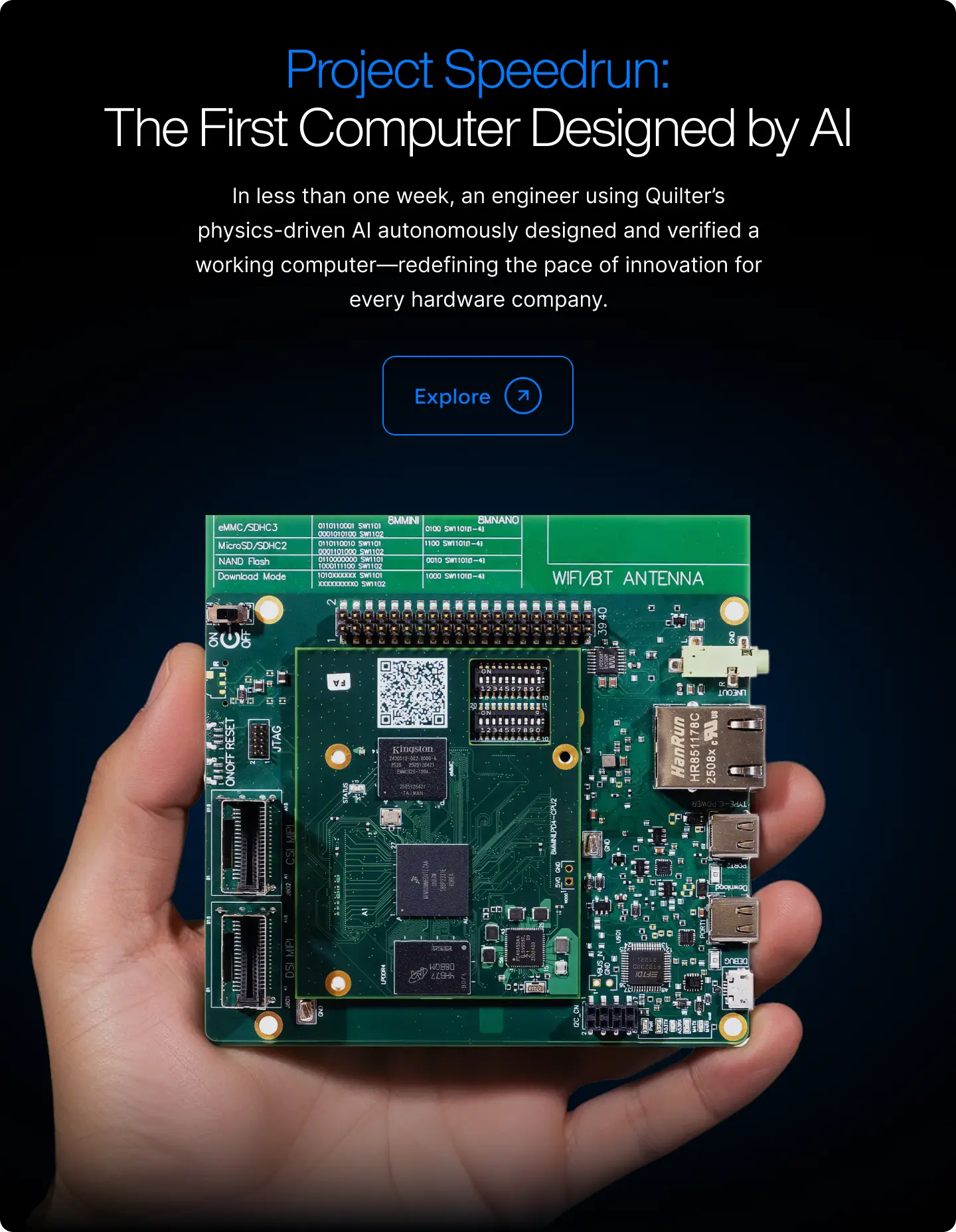
Project Speedrunは、当社の物理駆動型AIを使って、完全なコンピューターをできる限り短期間で設計するという挑戦です。このブログシリーズでは、そのシステムがどのように開発されたのか、そしてその背後にあるエンジニアリング上の判断を記録しています。まずはProject Speedrunの概要とその結果からご覧ください。
パート1〜4ではPCB設計を取り上げました。回路図の準備、Quilterの実行、出力のクリーンアップ、そして実際のワークロード下でのハードウェア検証です。2枚の基板はいずれもSierra Circuitsから戻ってくるとすぐに電源が入り、最初の試みでLinuxが起動しました。
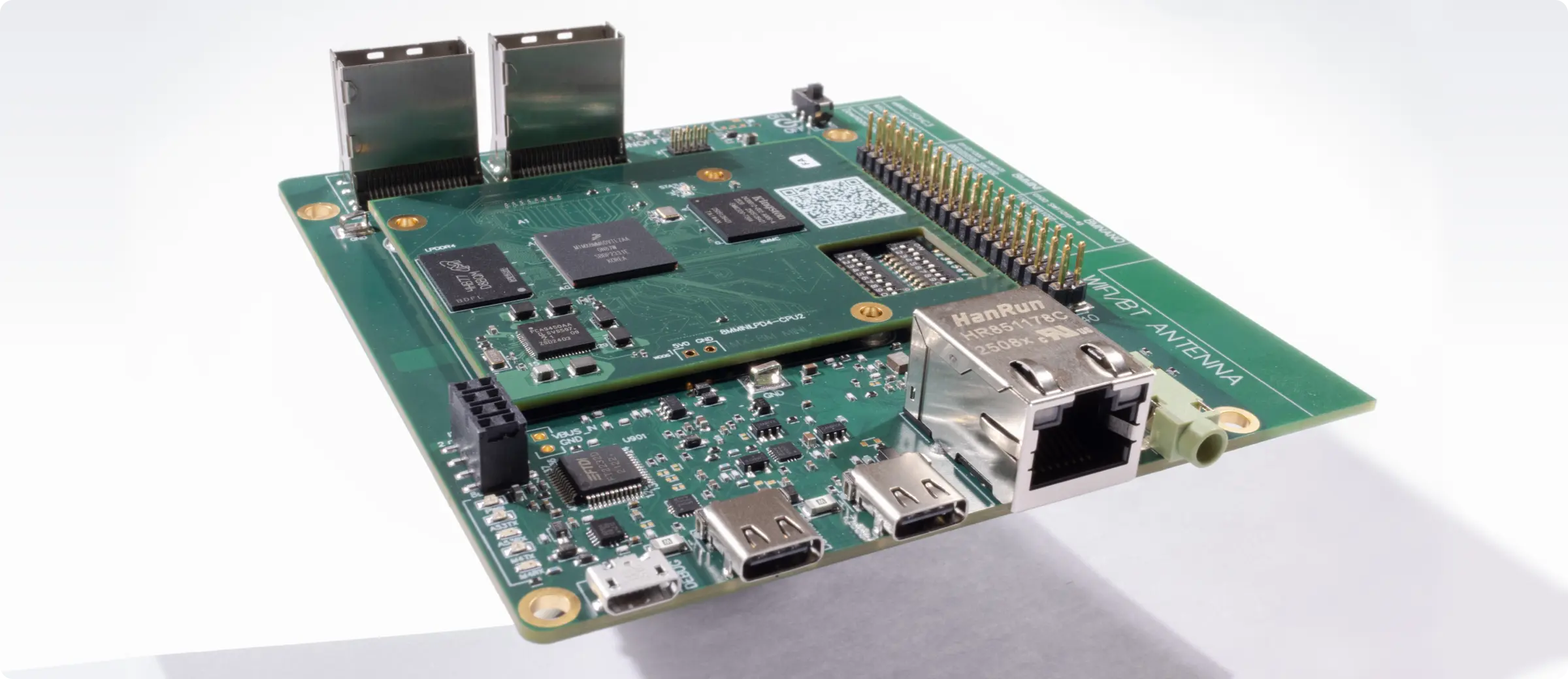
これでレイアウトが機能することは証明されました。本記事では、Speedrun基板を本物のコンピューターらしく仕上げるために何が必要だったのかを取り上げます。
仕様
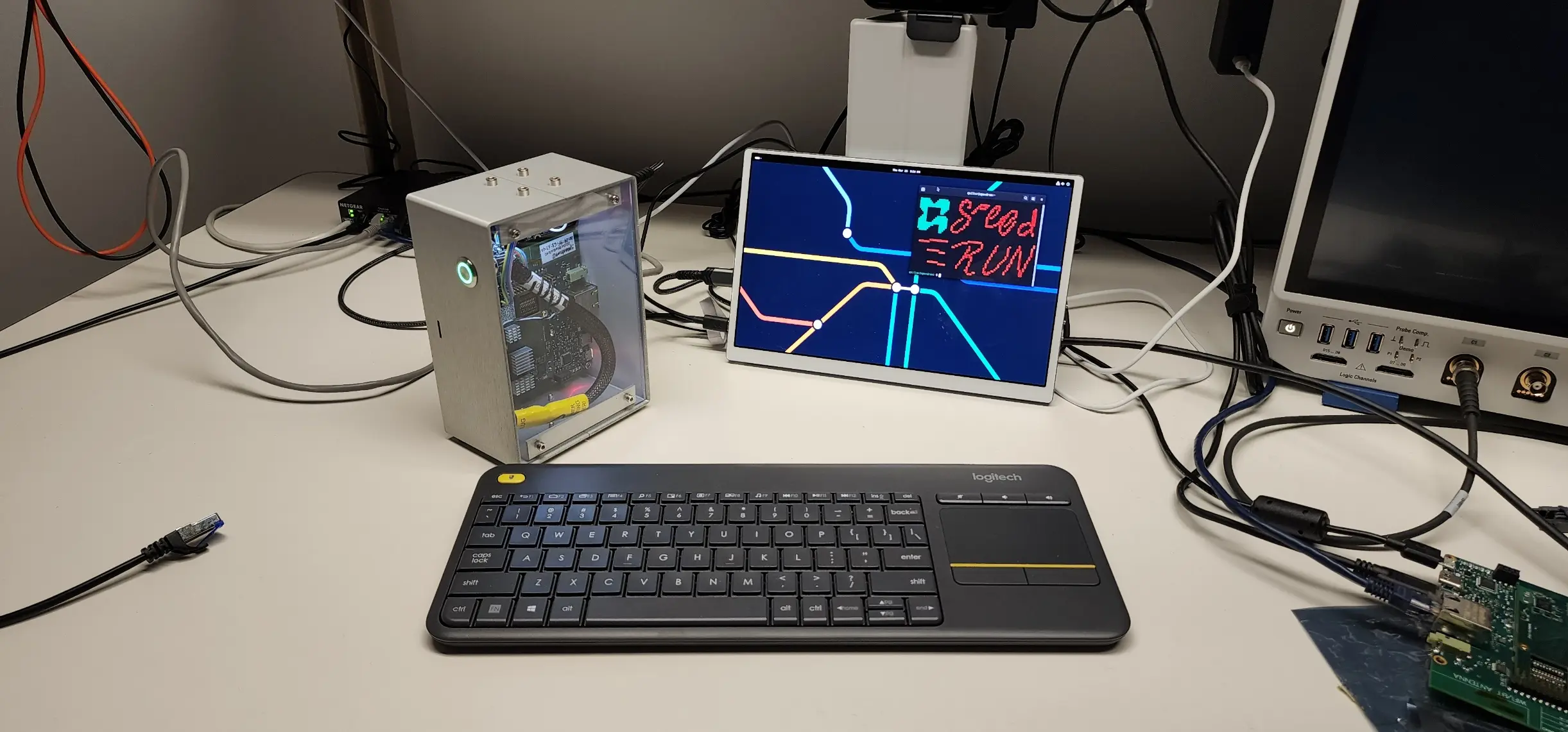
Project Speedrunは、単に電気的なテストに合格するだけの基板を作ることを目的としたものではありませんでした。プロジェクトの初期にSergiyが語った目標は次のとおりです。
「デスクトップまで起動して、Chromiumが動いて、Google Meetの通話に参加できなければならない。デモを主催して、最後にこう言いたいのです。『ちなみに、今まさにこのコンピューターで皆さんと話しているんですよ』」
これによって明確な基準が定まりました。Speedrunコンピューターには次のことが求められました。
- ユーザーフレンドリーなデスクトップ環境でLinuxを動かすこと。
- ハードウェアアクセラレーションによる動画処理を備えたChromiumブラウザを動かすこと。
- カメラと音声を使ってGoogle Meetのライブ通話に参加すること。
- 誰かが実際に使いたいと思えるコンピューターのような外観と動作を備えること。
Vivante GLES 2.0 GPUを搭載したクアッドコアARM Cortex-A53では、これらの要件はどれも簡単ではありません。いずれの要件も、ファームウェアエンジニアリング上の実質的な判断を迫るものでした。
ハードウェアの話においてソフトウェアが重要な理由
電源投入テストに合格するPCBは、必要なマイルストーンです。Google Meetの通話を実行できるPCBは、持続的な実環境の条件下でレイアウトが実際に機能することの証明です。つまり、定格速度で安定して動作するDDR4、信頼性の高いUSBおよびMIPIインターフェース、機能するオーディオ経路、そして負荷に耐える電源供給ネットワークです。
本記事で紹介するソフトウェア機能は、それぞれQuilterが設計したハードウェアの異なる部分を動作させます。Chromiumブラウザはメモリサブシステムと GPUインターフェースに大きな負荷をかけます。動画のエンコードとデコードはVPUバスと電源レールに負荷をかけます。オーディオ再生はコーデックの配線経路を検証します。半分遊びで入れたDoomでさえ、単純なテストパターンでは決して生じない形でGPUとフレームバッファを酷使します。
ファームウェアはハードウェア検証と切り離されたものではありません。それこそがハードウェア検証なのです。
ビルドシステム:YoctoとNXP BSP
NXPは、Walnascar(6.12)リリースをベースとしたYocto Board Support Package(BSP)によってi.MX 8M Miniをサポートしています。Yoctoは、NXPのアプリケーションプロセッサ上で組み込みLinuxを構築するための標準的なビルドフレームワークです。各パッケージの設定、パッチ適用、コンパイル方法を定義した「レシピ」から、完全なLinuxイメージを組み立てます。
NXPの標準イメージは、コンポジターとしてWestonを搭載し、Qtのデモアプリを含み、RPMパッケージングを使用しています。これはシリコンの機能を紹介するためのものであり、実用的なデスクトップとして設計されたものではありません。Speedrunの仕様を満たすには、デスクトップスタック全体を置き換える必要がありました。
そこで当社は、NXPのデフォルトを上書きするよう優先度99に設定したmeta-quilterというカスタムYoctoレイヤーを作成しました。このレイヤーには、標準BSPをSpeedrunイメージへと変えるために必要なすべてのレシピ、パッチ、設定が含まれています。このレシピの作成にご協力いただいたremodulate LLCのBrandin Claar氏に特に感謝いたします。
標準構成からの変更点は次のとおりです。
| 項目 | 標準NXP | Project Speedrun |
|---|---|---|
| デスクトップ | Westonコンポジター + Qtデモ | GNOME 48(Mutter 48 + GDM) |
| ブラウザ | なし | Chromium 129(V4L2 HWエンコード/デコード対応) |
| メディア | GStreamerデモ | mpv(V4L2 M2Mハードウェアデコード対応)、ffmpeg |
| ブートスプラッシュ | psplash(Yoctoデフォルト) | Plymouth(Quilterブランディング) |
| オーディオ | 基本的なALSA | PulseAudio(Bluetooth A2DP対応) |
| パッケージング | RPM | Debian(.deb)とapt |
| ゲーム | なし | GZDoom(Freedoom)、Quake |
この表のほぼすべての行で、Vivante GPUに対応するためのパッチ適用、設定の上書き、または回避策が必要でした。標準BSPはWestonコンポジターとNXPのデモアプリケーションを前提に設計されているため、完全なGNOMEデスクトップを動かすには、リファレンス構成を大きく超える作業が必要になります。
デスクトップ:Vivante GPU上のGNOME 48
GNOMEを選んだのは、ほとんどのLinuxユーザーが見慣れているからです。ターミナルウィンドウとQtデモが並ぶWestonセッションでは、「誰かが実際に使いたいと思えるコンピューター」という基準を満たせません。GNOMEには、タスクバー、ファイルマネージャー、システムトレイがあり、見慣れたデスクトップという期待に応えられます。
そこに到達するには、現実的な問題を解決する必要がありました。Vivante GC NanoUltraはGLES 2.0しかサポートしていませんが、Mutter(GNOMEのコンポジター)はいくつかのコードパスでGLES 3.0以上を前提としています。Mutter 46を使用した初期のビルドでは、MutterのマルチGPU検出が原因で画面のちらつきが続いていました。i.MX 8M MiniはDRMが分割されたアーキテクチャを採用しており、LCDIFディスプレイコントローラー用のデバイスと、Vivante GPU用の別のデバイスがあります。MutterはこれをマルチGPUシステムとして扱い、どのカードにレンダリングするかをめぐって自分自身と競合し続けていました。
アップストリームのトリプルバッファリングを含むMutter 48にアップグレードしたことで、ちらつきは解消されました。しかし、GLES 2.0上でGNOME 48を動かすには、依然として次のような的を絞った回避策が必要でした。
- GTK4にGLバックエンドではなくCairoレンダラーを使わせる。GLバックエンドは、VivanteドライバーがサポートしていないGLES 3.0の関数を呼び出すためです。
- COGLとClutterがGLES2ドライバーを明示的に使用するよう設定する。
- Mutterのビルドに、スタブのEGL Mesa拡張ヘッダーを挿入する。Mutter 48は、Vivante EGLが提供していないMesa固有のヘッダーを無条件にインクルードするためです。
- VivanteのEGLネイティブ型がMesaのものと異なるため、gnome-sessionにおける型互換性の警告を緩和する。
その結果、GLES2レンダリングによってWayland上で動作する、応答性の高いGNOME 48デスクトップが実現しました。GDMからログインし、ファイルマネージャーを開き、ターミナルを起動して、標準的なLinuxデスクトップとまったく同じようにシステムを操作できます。
難関:Chromiumとハードウェア動画処理
Chromiumは、Speedrunの仕様の中心でした。ChromiumがなければGoogle Meetの通話に参加できず、締めくくりの決めゼリフのデモも実現しません。
Speedrun基板でChromiumを起動すること自体は簡単な部分でした。NXPはすでにBSP内で、ChromiumのV4L2動画デコードパイプライン向けに22個のパッチを提供しており、AmphionおよびHantroデコーダー、HEVCサポート、G2D統合、NV12ゼロコピーをカバーしています。これらのパッチにより、Chromium 129はWayland/Ozone上で動作し、ハードウェアデコーダーを使って動画を再生できます。
しかし、動画のデコードはビデオ通話の半分にすぎません。Google Meetでは、ローカルのカメラ映像をエンコードして他の参加者に送信する必要もあります。これがエンコード経路であり、NXPのパッチはこれをカバーしていません。
i.MX 8M MiniにはHantro H1ハードウェア動画エンコーダーが搭載されていますが、Chromiumには、この種のデバイスでV4L2ハードウェアエンコードを行うための組み込みサポートがありません。ChromiumのリアルタイムコミュニケーションスタックであるWebRTCは、デフォルトでソフトウェアによるVP8またはVP9エンコードを使用します。1.8 GHzのCortex-A53では、会議品質の解像度でのソフトウェアエンコードはリアルタイム用途には遅すぎます。
この問題を解決するため、当社は3つのカスタムChromiumパッチを作成しました。
パッチ1:V4L2 MMAPハードウェアエンコード。これは8つのChromiumソースファイルに手を入れる主要なパッチです。Hantro H1エンコーダーに対してV4L2がMMAPメモリタイプを使用するよう強制し、ストライドを考慮したバッファコピーを追加し、ハードウェアコーデックが選択されるようVP9ソフトウェアエンコーダーを削除し、WebRTCのネゴシエーションでハードウェアフォーマットを優先し、そうしなければハードウェア経路を迂回してしまう低解像度時のソフトウェアフォールバックを無効にします。
パッチ2:コーデックのデバッグフラグ。--webrtc-disable-vp8や--webrtc-disable-h264などのCLIフラグを追加し、開発中にコーデックの問題を切り分けられるようにしました。ビデオ通話でフレームが落ちる原因をデバッグしているとき、特定のコーデック経路を強制できれば何時間も節約できます。
パッチ3:GLES 2.0のヌルポインタ修正。ChromiumのGPU拡張機能の列挙処理はglGetStringiを呼び出しますが、これはGLES 3.0以上の関数です。Vivanteドライバーでは、この関数ポインタはNULLです。ChromiumはGLES 3.0を最低要件と想定しているため、呼び出す前にNULLかどうかを確認しません。当社のパッチは、初期化時に安全なスタブを組み込みます。thin LTOはコンパイル単位をまたいでインライン化を行うため、呼び出し箇所でのガードでは不十分となり、修正はドライバーバインディング層に入れる必要がありました。
3つのパッチをすべて適用することで、ChromiumはSpeedrun基板上で、ハードウェアアクセラレーションによる動画のデコードとエンコードを伴って動作します。基板はGoogle Meetの通話に参加し、カメラ映像を送信し、リモート参加者の映像を受信でき、そのすべてがハードウェアパイプラインを通じてレンダリングされます。
ブートシーケンスとブランディング
当社は、Speedrun基板を、寄せ集めのイメージを動かす開発用基板のようにではなく、電源を入れた瞬間から完成品のように感じられるものにしたいと考えました。ブートシーケンスはそれを反映しています。
U-BootはQuilterのスプラッシュロゴを表示し、デバイスツリーのモデル文字列として「Project Speedrun」を報告します。カーネルは、コンソール出力を抑制し、フレームバッファコンソールへの切り替えを遅らせた状態で静かに起動します。PlymouthはU-Bootから表示を引き継ぎ、DRM/KMSディスプレイにスピナーアニメーションとQuilterのウォーターマークを表示します。最後にGDMがログイン画面を表示します。デフォルトユーザーは「speedrun」、ホスト名も「speedrun」です。
こうしたブランディングには、U-Bootのロゴ差し替え、デバイスツリー文字列の変更、メッセージを抑制してPlymouthを有効にするためのカーネルコマンドラインの設定、そしてPlymouthとGDMの間の引き継ぎを調整するためのsystemdドロップインが必要でした。細かな点ですが、これがデモと製品の違いを生みます。
お楽しみ要素:Doom、Quake、メディア再生
Speedrun基板に搭載したものがすべて厳密に必要というわけではありません。一部は、できるから、そしてデモをより印象的なものにするために入れています。
GZDoomとFreedoomのWAD。Vivante GLES2レンダラー上で動作する完全なDoomエンジンです。FreedoomはEpisode 1とEpisode 2の両方にオープンソースのゲームコンテンツを提供しています。AIが設計したコンピューターでDoomが動くなら、それはエンジニアの心に響く一種の概念実証になります。
Quake。SDLベースのGLES1移植版で、GCC 14との互換性のためにパッチを適用しています。Doomとは異なる形でGPUを動作させる、もう一つの名作です。
mpvとffmpeg。どちらもV4L2 M2Mハードウェアデコード対応でビルドしているため、ソフトウェアデコードでCPUサイクルを消費する代わりに、Hantro VPUが動画の展開を処理します。Vivante Vulkan ICDが壊れているため、mpvはOpenGL APIを強制的に使うよう設定しています。
Firefox 147。Chromiumと並べてインストールしたビルド済みのARM64バイナリで、一般的なブラウジング用の2つ目のブラウザとなります。
PulseAudio。WM8524コーデックを介したEVKのライン出力ジャック向けに設定したオーディオサポートです。標準BSPにはPulseAudioが含まれていますが、GNOME向けに有効化する必要がありました。
BSPの拡張
meta-quilterレイヤーのかなりの部分は、もともと想定されていなかったユースケースにBSPを適合させるために存在します。これは組み込みLinux開発では普通のことです。シリコンベンダーのBSPはそれぞれのリファレンス構成に最適化されており、そのベースラインを超えようとした途端(たとえばWestonの代わりにGNOMEを動かすなど)、調整が必要な前提に突き当たります。
いくつか例を挙げます。デフォルトのWeston構成では不要なため、標準BSPはGTK3でPulseAudioとX11のサポートを無効にしています。GNOMEを動かすには、その両方を再び有効にする必要があります。BSPに含まれるsystemdのパッチは以前のsystemdバージョンを対象としており、257.6と競合します。アップストリームのUnicodeライセンスファイルは、リリース間でチェックサムが変わっていました。同梱のlibdisplay-infoのバージョンは、Mutter 48が必要とするバージョンよりも古いものでした。
meta-quilterレイヤーは、これらの一つひとつに的を絞ったbbappendファイルで対処しています。また、2つのBSPソースファイルはYoctoの:remove演算子を使用しており、下流のレイヤーから上書きできないため、直接パッチを当てる必要があります。適合作業の全一覧はGitHubリポジトリに記載しています。
オープンソース
ファームウェアのレシピ一式は公開されています。リポジトリには、meta-quilter Yoctoレイヤー、すべてのカスタムパッチ、ビルド設定ファイル、ステップごとのビルドガイドが含まれています。i.MX 8M Mini EVK(またはSpeedrun基板)をお持ちであれば、イメージ全体をソースから再現できます。
リポジトリ:https://github.com/xjordanx/speedrun
これを公開したのは、SpeedrunのPCB設計ファイルを公開しているのと同じ理由からです。透明性が信頼を築くからです。エンジニアは、レイアウトを検証できるのと同じようにファームウェアも検証できます。すべてのパッチ、すべての回避策、すべてのビルドフラグが見える状態になっています。
ソフトウェアがハードウェアについて証明すること
本シリーズのパート1〜4では、見積もりで428時間とされた作業を人手38.5時間に圧縮したレイアウトプロセスを記録しました。それが効率の物語です。本記事は能力の物語です。
Speedrun基板は、ハードウェアアクセラレーション対応のChromiumを備えたGNOME 48デスクトップを動かし、ライブのビデオ通話に参加し、Doomをプレイし、ハードウェアVPUで動画をデコードし、Bluetooth経由で音声をストリーミングします。しかもそれを、Quilterが設計し、Sierra Circuitsで製造され、初回の試作で起動した基板上で実現しています。
基盤となるレイアウトにシグナルインテグリティの問題、電源供給の問題、あるいは高速インターフェースの配線エラーがあれば、このソフトウェアはどれも動作しなかったでしょう。ファームウェアは、ハードウェアの物語の上に載った単なる一層ではありません。AIが設計したレイアウトが本当に通用するかどうかを確かめる、最後にして最も厳しいテストなのです。
そして、実際に通用します。