







Read the Full Series
This article is one part of a walkthrough detailing how we recreated an NXP i.MX 8M Mini–based computer using Quilter’s physics-driven layout automation.
Part 2 of 3 in our GPT-6 Astra PCB Design series.
Public reports show GPT-6 Astra routing some printed circuit boards (PCBs) and preparing native projects in KiCad and EasyEDA Pro. We actively follow the developments in this space, and searched far and wide for any documented reports of GPT-6 Astra and other frontier models used for PCB design. We reviewed eight reports available as of October 26, 2026. There might be more reports out there that did not show up in our search. They start from different inputs, allow different tools, and stop at different stages of verification, so their results don’t support a common success rate or a direct comparison of time saved.
The reports show useful progress. None of them measures how much human work it took to get from the model’s output to a board an engineer would sign off. This review compares the workflows, checks, fabrication evidence, and gaps in each report, along with public PCB tests of Claude models. The boards are mostly small and simple, and we include them because they are what has been published so far. Most of the reports come from companies that sell PCB fabrication or design tools, as Quilter does, so keep that in mind when reading the results.
OpenAI’s launch post for GPT-6 Astra on September 3 included a 15-second condensed clip of Astra laying out a PCB in KiCad. Astra is available in ChatGPT on the Plus, Pro, Business, and Enterprise plans and through OpenAI’s API. In Part 1, we looked at that demo and at why large language models (LLMs) still struggle with PCB layout.
Key Findings
- Routing. In NextPCB’s KiCad test, Astra used the open-source Freerouting autorouter to finish the job, and JLCPCB’s write-up describes the same approach, though its FAQ says the routed layout was reused from an earlier task. NextPCB got a routed board in about 12 minutes that way, and three trace segments in an hour using only the KiCad interface. In a test that GitHub user cyjjjj-21 ran with no Freerouting installed, Astra placed and routed a two-layer KiCad demo board with KiCad’s own tools and finished with zero unconnected items.
- Checks. JLCPCB’s two-layer amplifier passed KiCad’s electrical and design rule checks under the configured rules, with nine check categories ignored. It was never fabricated.
- Fabricated boards. Cherry Blossom, which sells an AI PCB design tool, is the only source claiming that boards designed with Astra have been fabricated, and it gives no details about any of them, so the claim can’t be verified. The only documented case we found of an LLM-designed board that was fabricated and works is a small board designed with Claude Fable 5. Photos of an assembled gigabit switch credited to Astra appeared on X on October 25, without a write-up.
- Other models. OpenAI released GPT-6.1 Sol on September 29 but not the GPT-6.1 Astra that had been expected. JLCPCB has since tested Claude Opus 5.5 in EasyEDA Pro.
- Gaps. The boards in these tests are relatively simple, with two to six layers: JLCPCB’s amplifier has two layers and measures 44 x 34 mm, the demo board in cyjjjj-21’s test has 63 footprints on two layers, and GoFly’s flight controller has six layers. None of the tests specify how many engineering hours a board needed after the model’s run.
Eight Public GPT-6 Astra PCB Tests at a Glance
We reviewed reports published after Astra’s September 3 release, in the versions available on October 26, 2026. A report qualified if it was a published write-up, repository, or video describing specific PCB design work done with GPT-6 Astra; social posts without a write-up didn’t qualify. We read each report but didn’t inspect the design files or rerun any test, so the table records what each report says.
The eight reports don’t measure the same thing. NextPCB ran two routing attempts on one board, JLCPCB published two reports on the same amplifier, and Cherry Blossom reported a single result for 40 boards. Five come from companies with a stake in PCB design, and three were posted on GitHub, YouTube, and the Tindie Blog. In the last column, “not fabricated” means the report says so, and “fabrication not reported” means it doesn’t say.
Test | Published by | What it tested | Tools used | What it reported |
NextPCB, a PCB fab | One placed board, routed twice | KiCad, version not stated; Freerouting in one run, no external tools in the other | About 12 minutes with Freerouting; 3 trace segments in 1 hour without external tools; fabrication not reported | |
JLCPCB, a PCB fab | A four-line brief to a 44 x 34 mm, two-layer amplifier | KiCad 10.0.4, including its command-line tools; Freerouting | Routed layout reused from an earlier task; 0 ERC and 0 DRC violations, with 9 check categories ignored; not fabricated | |
JLCPCB, a PCB fab | The same amplifier imported into EasyEDA Pro | EasyEDA Pro 3.2.149; KiCad 10.0.4 and Freerouting 2.0.1 also used | 50 association mismatches fixed, then zero errors; software checks only; not fabricated | |
Microduck compute module (reviewed by DeepPCB) | DeepPCB, an AI routing company | A 4-layer, 70 x 60 mm compute module a user had Astra design from a single prompt | Not stated | Five track widths with one net class; 9 of 32 vias in pads; DRC not reported; fabrication not reported |
Cherry Blossom, an AI PCB design tool maker | 40 of its own drone, robotics, and sensor boards | Not stated | Says 97% of 40 boards worked on the first run, behind its own verification gate; no board details, so it can’t be verified | |
cyjjjj-21, a GitHub user | KiCad’s two-layer PIC programmer demo, placed and routed from its schematic | KiCad 10.0.6 through computer use, with KiCad’s built-in autoroute and interactive router; no Freerouting, KiCad MCP server, or KiCad skill | 125 unconnected items to 0; 0 DRC and ERC errors, with 7 checks ignored; not fabricated | |
Gongyu Su, on the Tindie Blog | A robot-head controller with an ESP32-S31 module | Astra in Work Mode produced a KiCad project from two PDF schematics; version and router not stated | Nine unrouted nets, with the rest of placement and routing judged reasonable; not fabricated | |
GoFly, a YouTube channel | A six-layer STM32F405 drone flight controller, from schematic to layout | KiCad, operated by GPT-6 Astra in Codex; version and router not stated | About 3 hours 14 minutes and 51.9 million tokens; Gerbers exported; not yet fabricated |
These reports cover different stages of the work: routing a board, getting a native project’s schematic and layout to agree, passing the checks that were switched on, and reporting fabricated boards. A result at one stage doesn’t carry over to the others, so the eight reports can’t be combined into a single measure of how well Astra designs PCBs.
Routing Results Depend on the Toolchain
In NextPCB’s test, Hubert Hu, NextPCB’s head of technology, gave Astra a KiCad board with the parts already placed. Astra exported it to Freerouting, the open-source autorouter available as a KiCad plugin, and imported the result: “Around 12 minutes later, Astra produced a routed board.” Without external tools, routing with mouse and keyboard, Astra “had completed only three short trace segments” when Hu stopped it after an hour. NextPCB adds that “two runs on one PCB are not a comprehensive benchmark.”
JLCPCB’s KiCad project describes Astra protecting “the critical power, bootstrap, and switching connections” and then running Freerouting “to complete the remaining low-current nets.” Its FAQ adds that the routed layout in this project “came from an earlier amplifier task and was reused unchanged,” without saying who or what routed that earlier board.
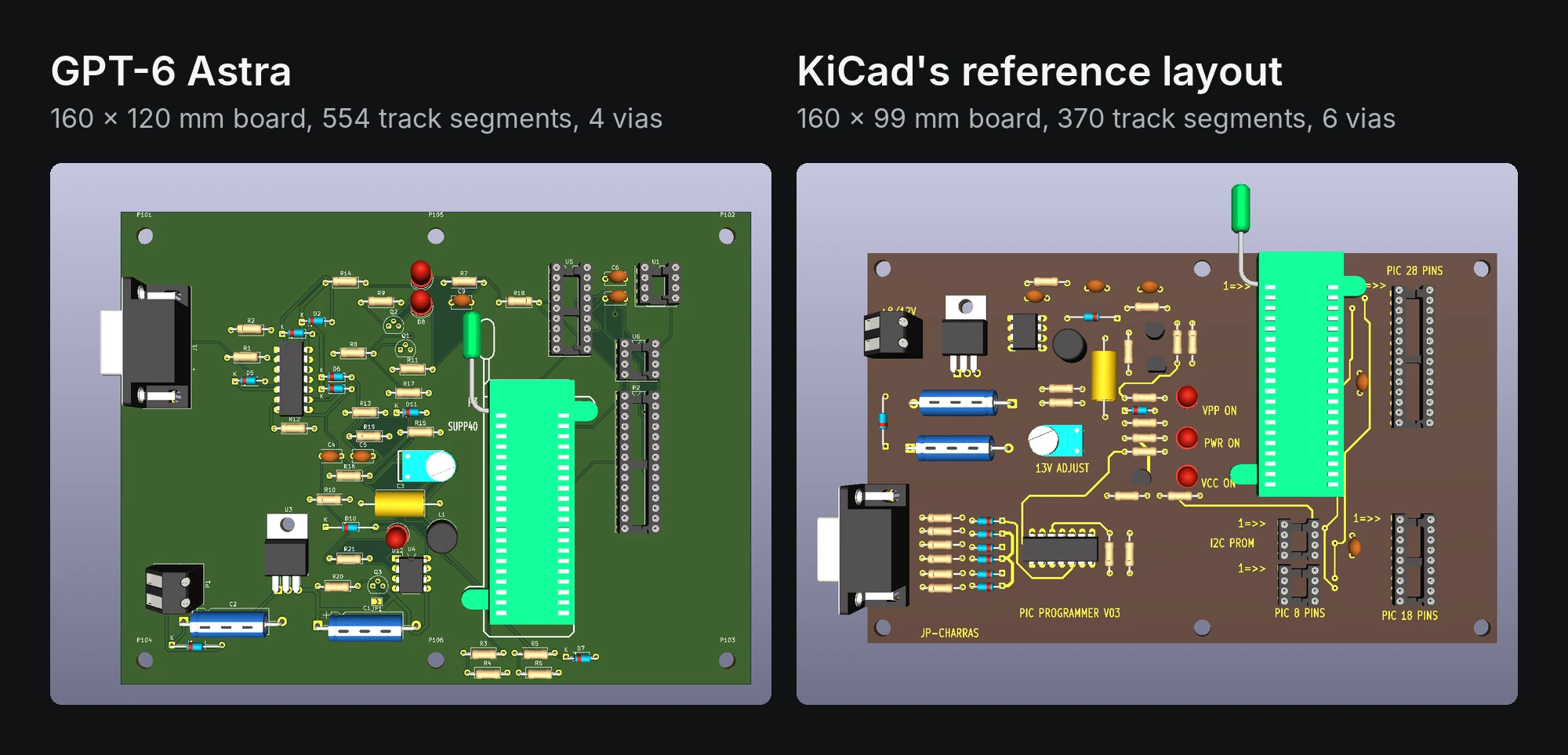
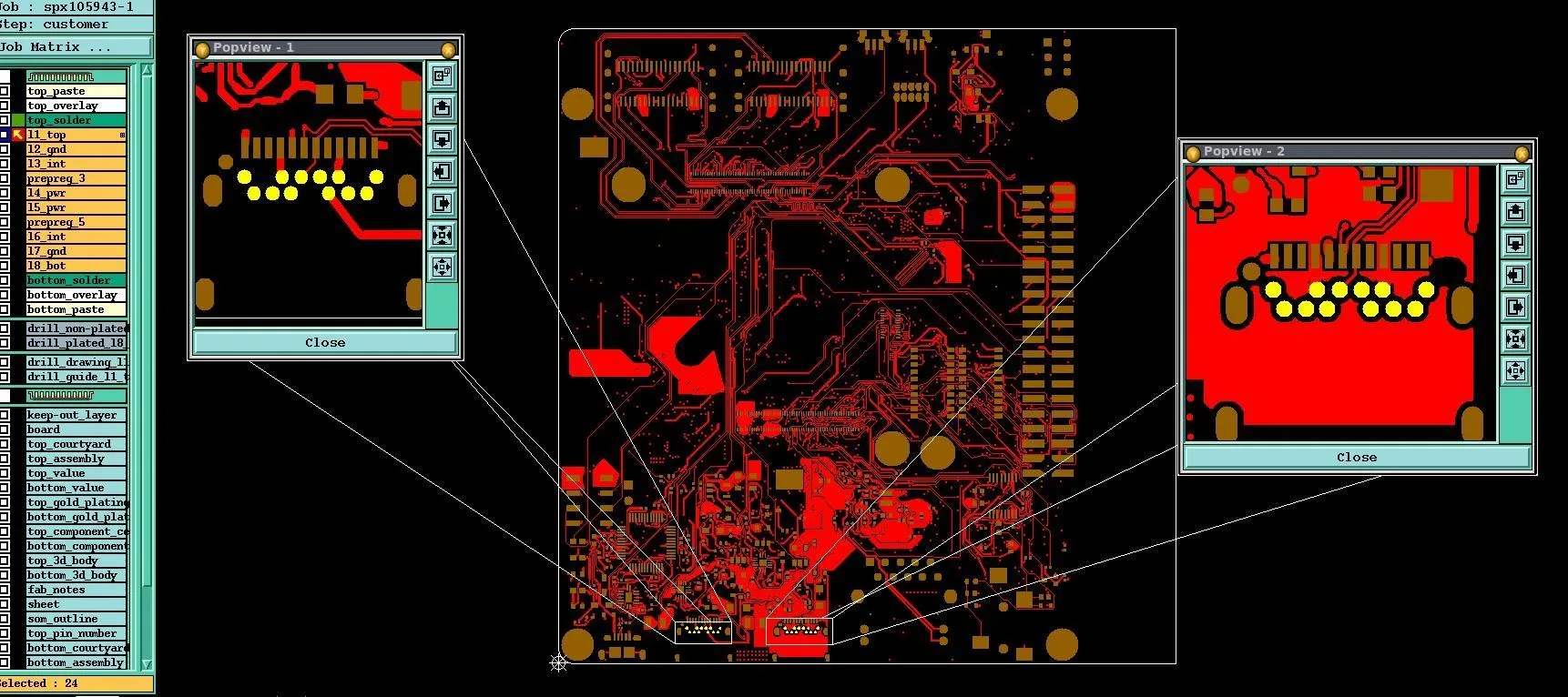
A test that GitHub user cyjjjj-21 posted shows what Astra did with no Freerouting, KiCad MCP server, or KiCad skill installed. The test’s README is in Chinese, and we read it with the use of AI translation. Starting from the schematic of KiCad’s bundled PIC programmer demo, a two-layer, mostly through-hole board with 63 footprints and 111 nets, Astra drew the board outline and placed the parts in KiCad 10.0.6, partly with KiCad’s own placement tools. It then routed the board with KiCad’s “Attempt Finish Selected (Autoroute)” command and interactive router, taking it from 125 unconnected items to zero. DRC and ERC reported no errors or warnings, with the project’s existing settings that ignore four DRC and three ERC checks left in place. Astra never saw KiCad’s reference layout during the run. Its version came out about 21% larger in area, with more track segments and fewer vias, as Figure 1 shows. The author says the write-up records one practical run and shouldn’t be read as a controlled benchmark, and the board wasn’t fabricated.
Handing the routing task to an autorouter is a reasonable choice for an agent. LLMs normally use specialized tools to complete specific tasks where appropriate. However, it brings us right back to the age-old autorouter discussion. A fully connected board can still fail its requirements, which is why we have argued that completion rate is the wrong target for any router.
A Clean DRC Covers the Rules That Were On
JLCPCB’s KiCad write-up is the most detailed. Across six recorded prompts, Astra turned a four-line brief for a 12 V stereo Class-D amplifier into a native KiCad project with a 44 x 34 mm, two-layer board. KiCad 10.0.4 “reported 0 ERC and 0 DRC violations under the configured rules,” and JLCPCB lists what was switched off: five design rule check (DRC) categories, such as missing courtyards, and four electrical rule check (ERC) categories, such as SPICE model issues. Those are categories of checks that were switched off. The count doesn’t tell you how many defects the board has, and whether the skipped checks matter depends on the requirements for this amplifier. KiCad’s 46 schematic-parity issues were fixed in the source data, with no rule exclusions added, and JLCPCB states that the board “has never been fabricated, assembled, or measured.”
The EasyEDA Pro follow-up imported the same routed amplifier into EasyEDA Pro, where the first native check “reported 50 association mismatches involving 120 PCB pads.” Repeated parts shared library names, so footprints that should have stayed separate were merged. Unique footprint names cleared the errors, and JLCPCB notes that “The board passed only software checks.”
DeepPCB, which sells an AI autorouter, reviewed a board Astra had designed. The board, a four-layer, 70 x 60 mm compute module for the Microduck robot with 27 nets, came from a user who had Astra design it from a single prompt. Astra’s version used five track widths but one net class: “The default, at 0.2 mm. Nothing is assigned to it.” In KiCad, net class widths are defaults for routing, and restricting tracks to specific widths takes custom rules; DeepPCB’s post doesn’t say whether the board had any. Astra also put 9 of its 32 vias inside component pads, a via-in-pad technique that DeepPCB says commits the board to a filled and capped via process. The post then reroutes the board with DeepPCB’s own tool and compares the two versions. That comparison measures DeepPCB’s router, so we leave it out. The post reports no DRC, impedance, or fabrication results for either version.
A zero-violation DRC means the board passed the rules that were switched on and written into the file, a point JLCPCB’s EasyEDA write-up also makes. Whether every requirement was captured as a rule, and whether anyone checked impedance, return paths, and decoupling, would need a separate review.
Other LLM PCB Tests
As usual in the world of AI, a lot changed in the weeks after Astra’s launch, and OpenAI, Anthropic, Meta, and Google all released new models. None of their launch announcements mentions PCB design. So far, Claude Opus 5.5 is the only one of the new models with a public PCB design test, and an earlier Claude model, Fable 5, has designed a board that was fabricated and powered up.
On EEBench, which grades AI models on circuit design in simulation and doesn’t include board layout, Claude Opus 5.5 now leads at 75.0% on its extra-high effort setting, with Astra second at 69.3% as of the October 14 update. The margins overlap among the top six entries. EEBench is built and funded by atopile, which makes electronics design tools. Our Part 1 covers what the benchmark measures.
JLCPCB has since put Claude through the same kind of project. Its October 13 test used Claude Opus 5.5 and Claude Code in EasyEDA Pro to build a two-layer, 71.1 x 50.8 mm component tester with 47 parts and a CH32V006 microcontroller. Freerouting connected all 33 nets with 443 segments and 28 vias, reading the netlist back caught six missing ground connections, and the final checks showed zero errors. In an October 14 KiCad project, Claude Code, with no model version stated, redesigned a two-layer, 63 x 33 mm XL4015 buck converter through a KiCad MCP server. The server had no autorouter, so Claude wrote a basic A* grid router in Python. A pin-by-pin netlist comparison caught a short between the ISENSE and ISET nets that KiCad’s ERC had raised only as a warning. Neither board has been fabricated.
A board designed with Claude Fable 5 has made it through fabrication and bring-up. The author of the A6M-Zero blog had Fable 5 design a four-layer, 31.8 x 37.32 mm board for an RP2350 microcontroller and a 1.54-inch e-ink display, working in KiCad through a KiCad MCP server. JLCPCB built and assembled five boards for €130, and the board was recognized as soon as it was plugged into a laptop. It runs the author’s test apps, including an e-reader and a stopwatch. The run needed help along the way: Freerouting left 49 connections unrouted, which Claude then routed without the autorouter; a DRC check that a colleague suggested found 65 errors, which the author passed back to the model; and two parts had packages whose pads didn’t fit, which the author found when uploading the order to JLCPCB. Wccftech reports that the project cost about $450 in API credits.
We haven’t found a public layout test of GPT-6.1 Sol yet.
Public Tests Don’t Tell the Full Story
The boards described in these reports are small or simple. JLCPCB’s amplifier is two layers and 44 x 34 mm, the Microduck compute module that DeepPCB reviewed is four layers with 27 nets, and cyjjjj-21’s test used KiCad’s two-layer, mostly through-hole PIC programmer demo. GoFly’s flight controller has the most layers, at six. NextPCB and Cherry Blossom don’t describe their boards, and the Tindie Blog post doesn’t give a layer count. None of the reports, including the Claude tests above, describes a board with external DDR memory, BGA packages, controlled-impedance differential pairs, high-speed interfaces such as PCIe or Ethernet, or RF circuitry. The Tindie Blog board uses a ready-made ESP32-S31 module, and its author notes that the antenna keep-out around it still needs work. Two of the authors say their boards are simple: cyjjjj-21 writes that results from a two-layer, mostly through-hole board can’t be extended to dense BGA, high-speed, RF, or complex multilayer boards, and the A6M-Zero author writes that the Fable 5 board “is not a complex PCB by any means.”
Only one of the reports we reviewed claims boards designed with Astra have been fabricated, and there’s no way to verify it. Cherry Blossom, which sells a browser-based PCB design tool with built-in AI, says it used Astra to design 40 of its own boards for drones, robotics, and sensors, and that, behind its own verification gate, 97% of them came back from the fab “working on the first run, with no respin.” Its post includes no photos, schematics, or layouts of the boards, no layer counts, sizes, or part counts, and no list of what the boards were. It doesn’t say which fab made the boards or when, or explain how “working” was checked. It also doesn’t say how the 97% was counted, and 97% of 40 boards isn’t a whole number. We were inclined to dismiss this report altogether as just a marketing claim, but decided to include it for completeness since it does show up in relation to this topic.
On October 25, Peter Bowman-Davis, who works on special projects at OpenAI, posted photos on his X account of a five-port gigabit Ethernet switch built around a Microchip KSZ9477 switch chip, with an OpenAI logo on the silkscreen, captioned “Astra gigabit network switch.” The photos show an assembled board with network cables plugged in and link lights on, which means the ports negotiated a connection; the post doesn’t report throughput or any other test. When a reply asked whether Astra designed it fully, he answered with a GIF of a cat nodding, and he said he would need to check before sharing layout screenshots. Because it’s a social post without a write-up, it isn’t in the table, but it’s the first assembled, powered board credited to Astra that we’ve seen. In an October 13 post, he described the setup he uses for LLM PCB layout: a KiCad 10.99 nightly build driven through KiPy, KiCad’s Python interface, and computer-use tools, with no autorouter, components placed one at a time or in small groups, and routing rules written into the prompt. He wrote that this approach can push run times to hours or tens of hours for boards with 100 or more nets.
Astra gigabit network switch.
— PHBD (@0x50484244) October 26, 2026
They're frying me in the OpenAI Instagram Reels comment section so here's the X dot com the everything app exclusive content. ♥️ pic.twitter.com/R27KOC1ycU
No report gives cleanup hours. JLCPCB lists the fixes it made, but no report says how long it took to get from Astra’s output to a board that can be sent to fab. Engineers ask for that number when they evaluate any layout tool, ours included, because it decides how much time the tool saves. The closest figure in these reports is an estimate: Gongyu Su, whose Astra board still had nine unrouted nets, wrote on the Tindie Blog that “it can already save me well over half of the time I would normally spend on the initial design.”
Engineers have also asked to see it in Altium Designer. Replying to a post on the GHI Electronics forum that GPT-6 “can route simple PCBs,” one user wrote, “I want to see this inside altium.”
Five Questions to Ask of Any AI PCB Layout Test
A design review already asks these questions, and we apply them to every layout tool, including Quilter.
- What was the starting point? The schematic, outline, stackup, constraints, and anything placed or routed beforehand.
- What tools could the model use? The ECAD tool and version, the interface (GUI, MCP server, or scripts), and any autorouter.
- What was verified? The DRC and ERC settings, any checks switched off before or during the run, requirements outside the rule set, and physical tests.
- How much human work did it take? Setup, supervision, fixes, failed runs, review, and total hours to a board you would sign off.
- Can someone inspect and repeat it? Published files and reports, more than one run or board, and the failures.
Each public report answers part of the list. JLCPCB answers the first three in detail and says its board was never built. The blind-routing test by cyjjjj-21 lists the DRC and ERC checks it left off. NextPCB and DeepPCB don’t report DRC results, and none of the reports gives cleanup hours. Part 3 answers the same five questions for our own Astra run.
What These Tests Say About Frontier Models and PCB Design
Frontier models can now operate ECAD tools well enough to take a simple board from a brief or schematic to a native project that passes its configured checks. Most of what they contribute is running the workflow: setting up projects, calling other tools, and reading the results back. The copper itself mostly comes from whichever autorouter the model calls, so routing quality in these reports depends on that router and on the rules written into the file.
Checking their own output against the netlist is the most promising habit in these reports. It caught errors in JLCPCB’s component tester and buck converter projects, and a report that shows this kind of check gives more reason for confidence than a clean DRC alone.
Progress isn’t tied to one model. The only documented LLM-designed board that was fabricated and works came from a Claude model, and Claude Opus 5.5 now scores above Astra on EEBench. Since results will keep shifting between models, judge a report by the tools and checks around the model and by who reviewed its output.
None of these reports can show yet whether the approach holds up on dense, high-speed boards or how many engineering hours it saves, because none tested such a board or counted the hours.
Next: GPT-6 Astra on an 8-Layer DDR Board in Altium
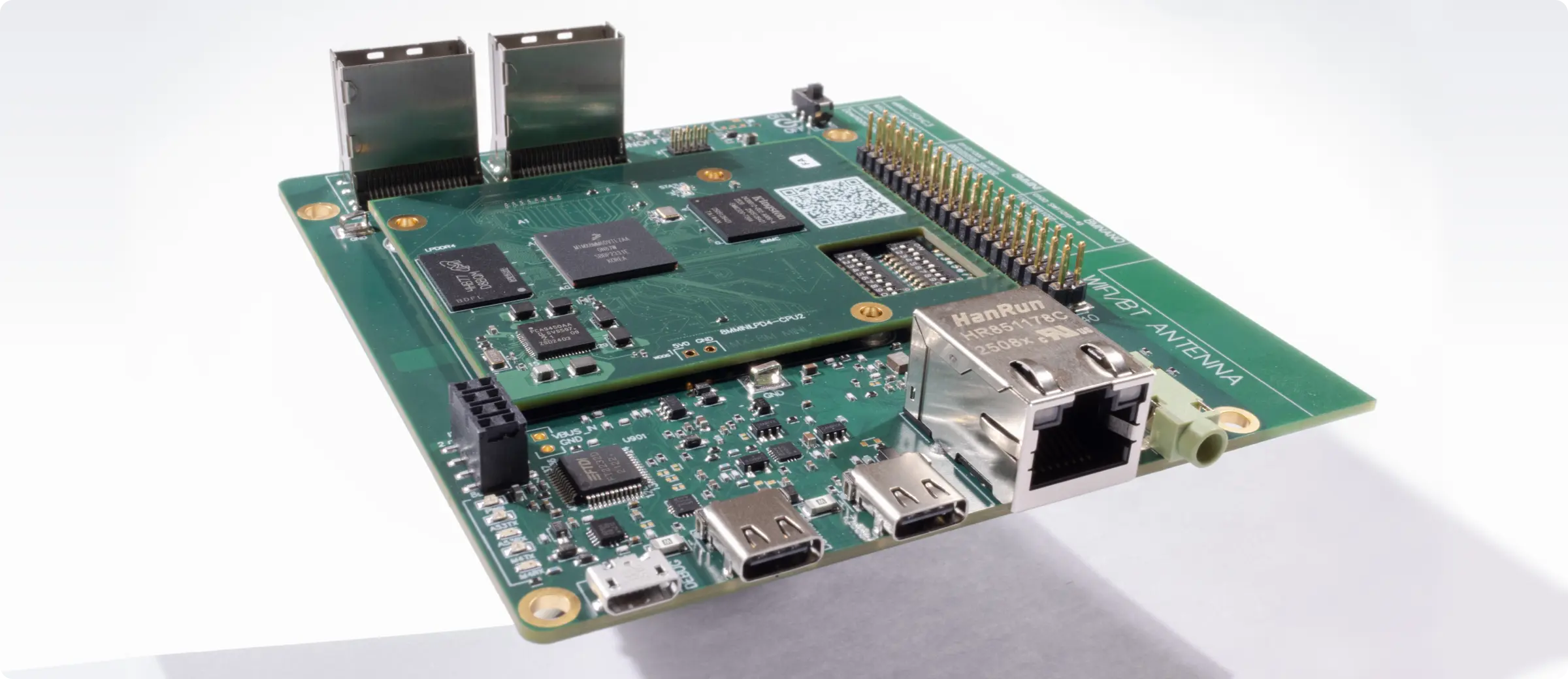
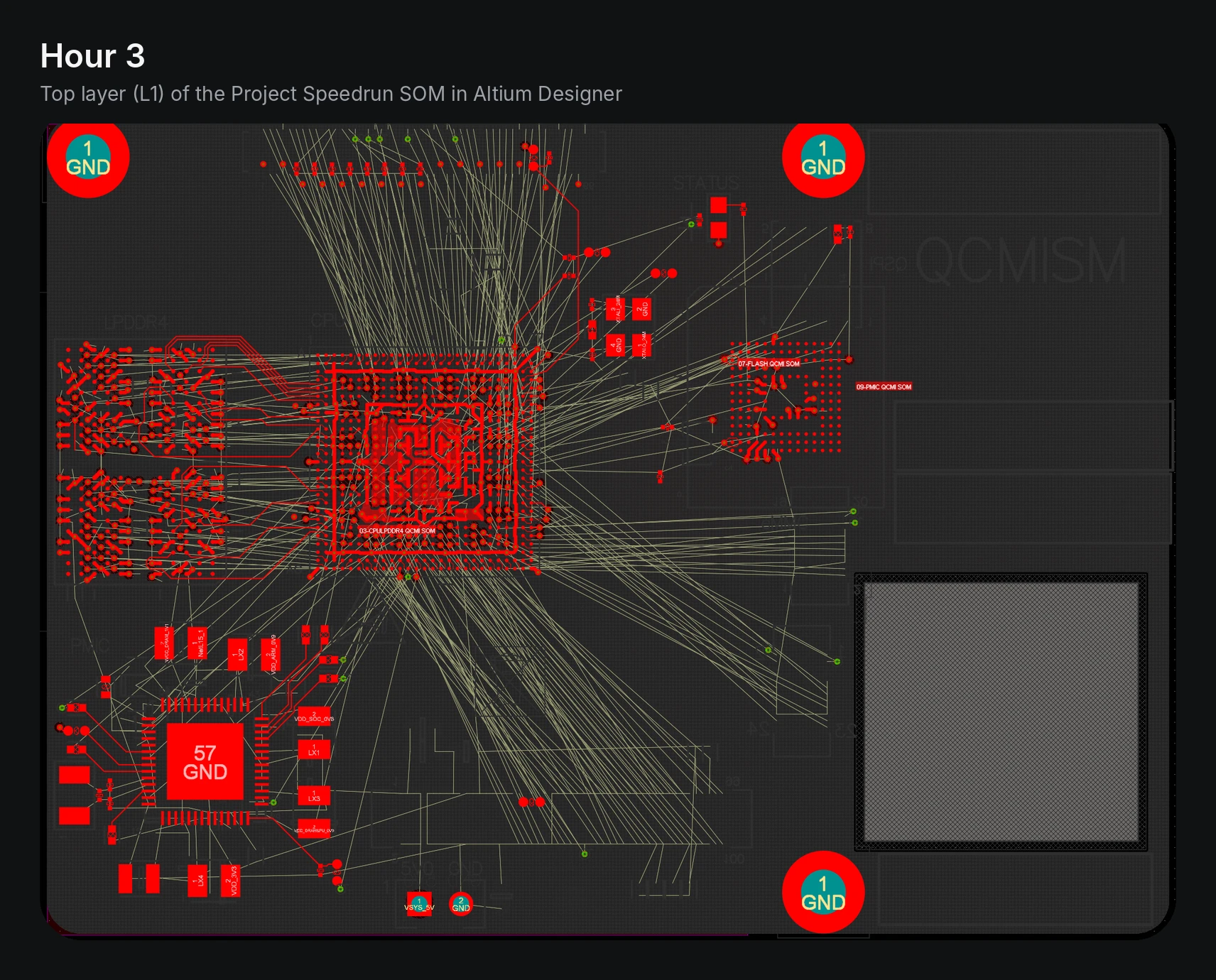
We wanted to see Astra on the kind of board these tests haven’t covered, so we ran it on the system-on-module from Project Speedrun, an 8-layer high-density interconnect (HDI) board with an NXP i.MX 8M Mini BGA and LPDDR4 memory. Astra worked in Altium Designer through computer-use tools, with Altium’s autorouter turned off. Part 3 has the results, the cost, and a timelapse of the run. Figure 2 shows the board in Altium Designer about 3 hours into the run. The thin straight lines are the ratsnest, the connections Altium still showed as unrouted.
To see how Quilter laid out the same board, download the Project Speedrun design files.
Frequently Asked Questions
Has Anyone Tested GPT-6 Astra on PCB Layout?
Yes. NextPCB and JLCPCB tested it in KiCad, JLCPCB moved a project into EasyEDA Pro, DeepPCB reviewed a board a user had Astra design, and Cherry Blossom says it ran it on 40 boards. Three more KiCad runs have been posted on GitHub, YouTube, and the Tindie Blog, including a six-layer drone flight controller. Cherry Blossom says its boards were fabricated, but it gives no details about them, so the claim can’t be verified. As of October 26, none of the reports we reviewed describes a board with DDR memory, BGA packages, high-speed interfaces, or RF circuitry.
Does GPT-6 Astra Use Freerouting?
In NextPCB’s KiCad test, yes: Astra exported the board to Freerouting and had a routed result in about 12 minutes; limited to the KiCad interface, it drew three trace segments in an hour. JLCPCB’s write-up says Freerouting finished the low-current nets, though its FAQ says the routed layout came from an earlier task. In a test that GitHub user cyjjjj-21 ran with no Freerouting installed, Astra used KiCad’s built-in autoroute command and interactive router and finished with zero unconnected items.
Does Passing DRC Mean a PCB Will Work?
No. A DRC pass means the board cleared the checks that were switched on and written into the design file. JLCPCB’s Astra board reported zero violations with nine check categories ignored and was never fabricated. Impedance, return paths, and decoupling need their own checks, then bench testing.
Who Published the GPT-6 Astra PCB Tests?
JLCPCB and NextPCB sell PCB fabrication, and DeepPCB and Cherry Blossom sell AI design tools. Each report says who ran it, and several state their own limits. The other three runs were posted on GitHub, YouTube, and the Tindie Blog, and none discloses a sponsor.
Is There a Newer Version of GPT-6 Astra?
No. As of October 26, OpenAI hasn’t released a GPT-6.1 Astra, which had been expected. It released GPT-6.1 Sol on September 29 and describes it as “Near-Astra intelligence for a fifth of the price.” On EEBench, a circuit design benchmark that doesn’t include layout, Claude Opus 5.5 on its extra-high effort setting now scores higher than Astra, 75.0% to 69.3%, and JLCPCB has already tested Opus 5.5 on a PCB in EasyEDA Pro.
Related Reading
- Part 1: Can LLMs Design PCBs? GPT-6 Astra and AI PCB Layout Automation
- Part 3: GPT-6 Astra in Altium: 62 Hours on an 8-Layer PCB
- The PCB Autorouter Was the Right Idea. Completion Rate Was the Wrong Target.
- Glossary: Autorouter · KiCad · Design Rule Check (DRC) · Electrical Rule Check (ERC) · Freerouting · KiCad MCP Server
Sources
- A6M-Zero. “This PCB Is Brought to You by Fable 5.” September 4, 2026.
- Anthropic. “Introducing Claude Opus 5.5.” September 22, 2026.
- Arnaud and Anass. “Can GPT-6 Astra Design a PCB? We Ran It on 40 Boards.” Cherry Blossom, September 5, 2026, updated October 1, 2026.
- Bowman-Davis, Peter (@0x50484244). “A few KiCAD <-> LLM PCB layout tips from personal experience.” X, October 13, 2026.
- Bowman-Davis, Peter (@0x50484244). “Astra gigabit network switch.” X, October 25, 2026.
- Cohen, Alain-Sam. “GPT-6 Astra Designed the PCB. DeepPCB Routed It Better.” DeepPCB, September 6, 2026, modified September 8, 2026.
- cyjjjj-21. “gpt6-astra-kicad-blind-routing.” GitHub repository, September 5, 2026. In Chinese.
- EEBench. “Can AI Design Circuit Boards Yet?” September 4, 2026.
- EEBench. “EEBench Leaderboard.” Updated October 14, 2026. Accessed October 20, 2026.
- GHI Electronics Forum. “GPT6 for PCB Development.” September 7, 2026.
- GoFly. “GPT-6 Astra 全自动设计 FPV 飞控 PCB,从原理图做到 F405 六层板” [GPT-6 Astra designs an FPV flight controller PCB automatically, from schematic to a six-layer F405 board]. YouTube video, September 5, 2026.
- Google. “Gemini 4 Argon Comes to the Gemini App.” The Keyword, October 13, 2026.
- JLCPCB. “Claude Code PCB Design: Can It Build a Real Board in EasyEDA Pro?” October 13, 2026.
- JLCPCB. “GPT-6 Astra PCB Design in EasyEDA Pro: What Worked, What Failed, and What We Learned.” September 15, 2026, updated September 28, 2026.
- JLCPCB. “GPT-6 Astra PCB Design in KiCad: From Brief to Verified Native Project.” September 14, 2026, updated September 28, 2026.
- JLCPCB. “KiCad MCP: How to Design a PCB with Claude Code [Step-by-Step].” October 14, 2026.
- KiCad. “PCB Editor.” KiCad 10.0 Reference Manual. Accessed October 21, 2026.
- Malik, Aisha. “OpenAI Launches GPT-6.1 Sol, Says It Nearly Matches GPT-6 Astra and Costs Less.” TechCrunch, September 29, 2026.
- Meta AI Research. “Muse Wonder: A Frontier Model for Personal and Professional AI Agents.” October 12, 2026.
- OpenAI. “GPT-6 Astra: A New Generation of Intelligence.” Accessed October 15, 2026.
- OpenAI. “Introducing GPT-6 Sol and Luna.” Accessed October 16, 2026.
- OpenAI. “Introducing GPT-6.1 Sol.” Accessed October 16, 2026.
- Quilter. “Can LLMs Design PCBs? GPT-6 Astra and AI PCB Layout Automation.” September 8, 2026.
- Quilter. “The PCB Autorouter Was the Right Idea. Completion Rate Was the Wrong Target.” June 3, 2026.
- Sohail, Omar. “Claude Fable 5’s Capabilities in PCB Design Might Be Limited, but One Person Shows It’s Actually Possible by Showing Off a Custom Board Made Entirely by AI, at a Cost.” Wccftech, September 11, 2026.
- Su, Gongyu. “I Designed a KiCad PCB with GPT-5.6 and GPT-6 — and It Changed How I Think About Hardware Design.” Tindie Blog, September 8, 2026.
- Zheng, Carmen. “Can GPT-6 Astra Automate PCB Routing? Don’t Panic, AI Isn’t Replacing PCB Designers Yet.” NextPCB, September 2026.



.webp)