











Read the Full Series
This article is one part of a walkthrough detailing how we recreated an NXP i.MX 8M Mini–based computer using Quilter’s physics-driven layout automation.
TL;DR: Quilter, DeepPCB, and Flux.ai are the three most-evaluated autonomous PCB design tools in 2026. Quilter generates physics-validated, multi-candidate layouts, supports air-gapped on-premise deployment for ITAR programs, and has produced fully validated 843-component, 8-layer designs (Project Speedrun). DeepPCB applies reinforcement learning to geometric routing within defined complexity limits. Flux.ai is a browser-based design environment with AI Auto-Layout for low-to-moderate complexity boards.
Three names keep coming up when hardware teams evaluate AI for PCB design: Quilter, DeepPCB, and Flux.ai.
The tools solve different problems, for different users, at different levels of board complexity. This post breaks down what each tool does, how they approach layout automation, and where each one is strongest. This guide is written for senior hardware engineers, PCB designers, and R&D leaders who need practical answers.
We work at Quilter, so you might justifiably assume we are biased, but we welcome the fact that multiple teams are working on this problem and will attempt to be as fair and accurate about DeepPCB and Flux as possible. Let us know if anything we state here is not factually true, and we will make corrections.
What is Autonomous PCB Design?
Autonomous PCB design uses AI or other techniques to generate complete printed circuit board layouts, including component placement and trace routing, with minimal human intervention.
That said, "autonomous" gets used loosely across the industry to describe everything from a classic autorouter to an AI assistant that suggests placement to a fully automated agent that can produce a full board.
Classic autorouters connect nets once the board is largely designed. They can be useful in some cases but are also notorious for producing subpar results.
AI copilots help with pieces of the workflow, like suggesting parts, generating snippets of circuitry, proposing placement options, or explaining constraints. You still do the integration work and a lot of the iteration.
Autonomous layout engines generate complete candidate layouts across the full board based on constraints and manufacturing rules. Autonomy here is not "it routed a few nets’” it is "it produced multiple full-board options you can review, clean up, and take to fab."
Why Teams Are Looking for Autonomous PCB Layout Tools in 2026
Hardware teams are being asked to ship more variants, more quickly, with fewer experienced PCB designers available per program. We have distilled the challenges into three key pressures faced.
The first pressure is schedule risk. Bring-up boards, DVT builds, and validation hardware often sit on a critical path. When layout slips, everything slips: procurement, assembly slots, lab time, firmware integration, and the next design spin. A one-week delay at layout can become a multi-week delay downstream once test windows and manufacturing queues move.
The second pressure is bandwidth. Senior PCB designers and hardware leads should be spending their time on the highest-risk nets, the hardest placement decisions, and the final design review. Instead, they're buried in routine routing work, because no one else on the team can do it and no tool they trust can take it off their plate.
The third pressure is iteration economics. Faster layout cycles let teams run more experiments, validate more hypotheses, and reduce unknowns earlier. That's the core promise behind PCB layout automation done right: more learning loops per unit time. At Quilter, we call this Hardware-Rich Development, where boards become abundant enough to support software-like iteration without sacrificing engineering rigor.
Quilter vs. DeepPCB vs. Flux.ai: What These Three Tools Actually Are
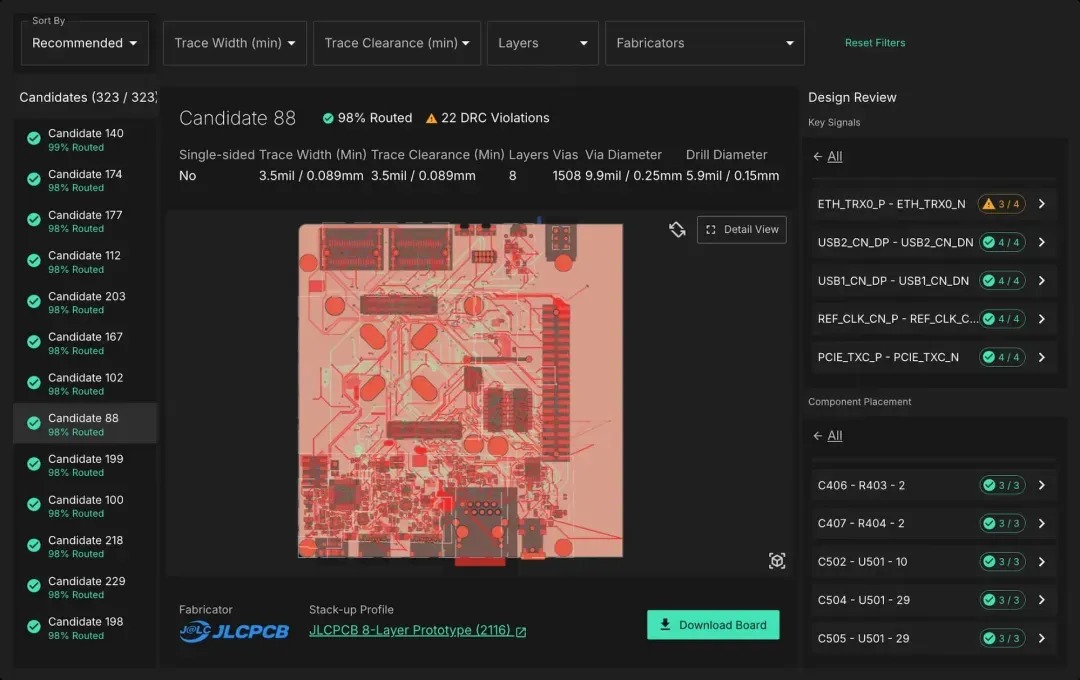
Quilter automates PCB placement and routing using physics-driven reinforcement learning. You upload a completed schematic and board file from Altium, Cadence, Siemens, or KiCad. Because Quilter reads your schematic, it understands circuit relationships that a PCB file alone can't express. Quilter generates multiple candidate layouts in parallel so you can compare tradeoffs. It also supports a hybrid workflow: you can place and pre-route the critical 20% (high-speed buses, sensitive analog, power delivery) and let Quilter handle the remaining 80%. Each candidate comes back with a physics scorecard that tells you exactly what was checked and how well each candidate performed.
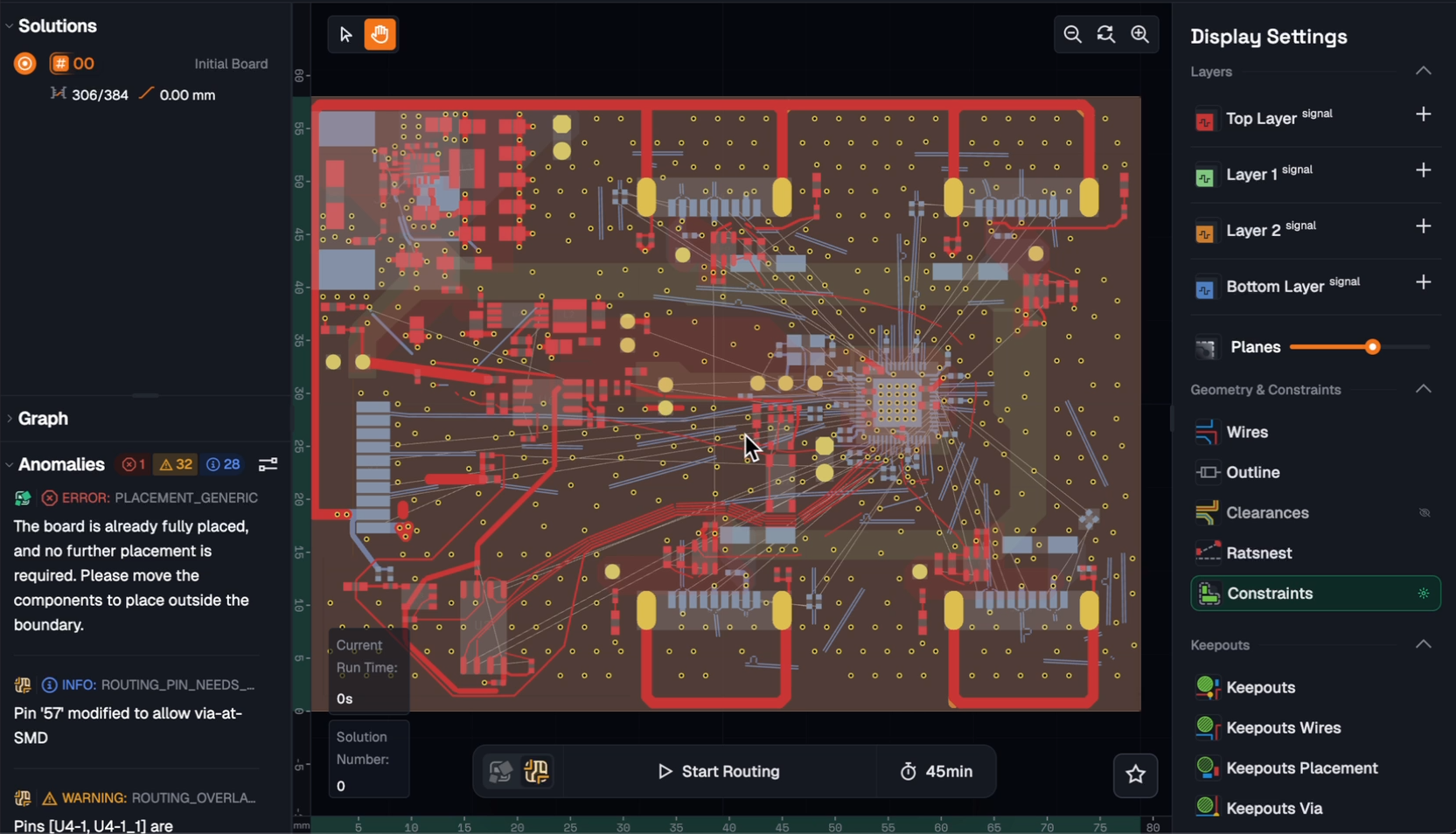
DeepPCB is a placement and routing engine built by InstaDeep (acquired by BioNTech, a pharmaceutical company, in 2023). It also uses reinforcement learning, trained through self-play iterations inside a custom C++ simulation engine. DeepPCB has native file support for Zuken and KiCad and imports from Altium, EasyEDA, Eagle, and Proteus. It handles both placement and routing: you upload your design files, the AI runs a continuous optimization within a time budget you allocate, and you download the best result it reaches. Longer compute time generally yields better results. Unlike Quilter's parallel candidate generation (where you get multiple distinct layouts back to compare), DeepPCB runs a single optimization and returns its best solution at the end of the time window.
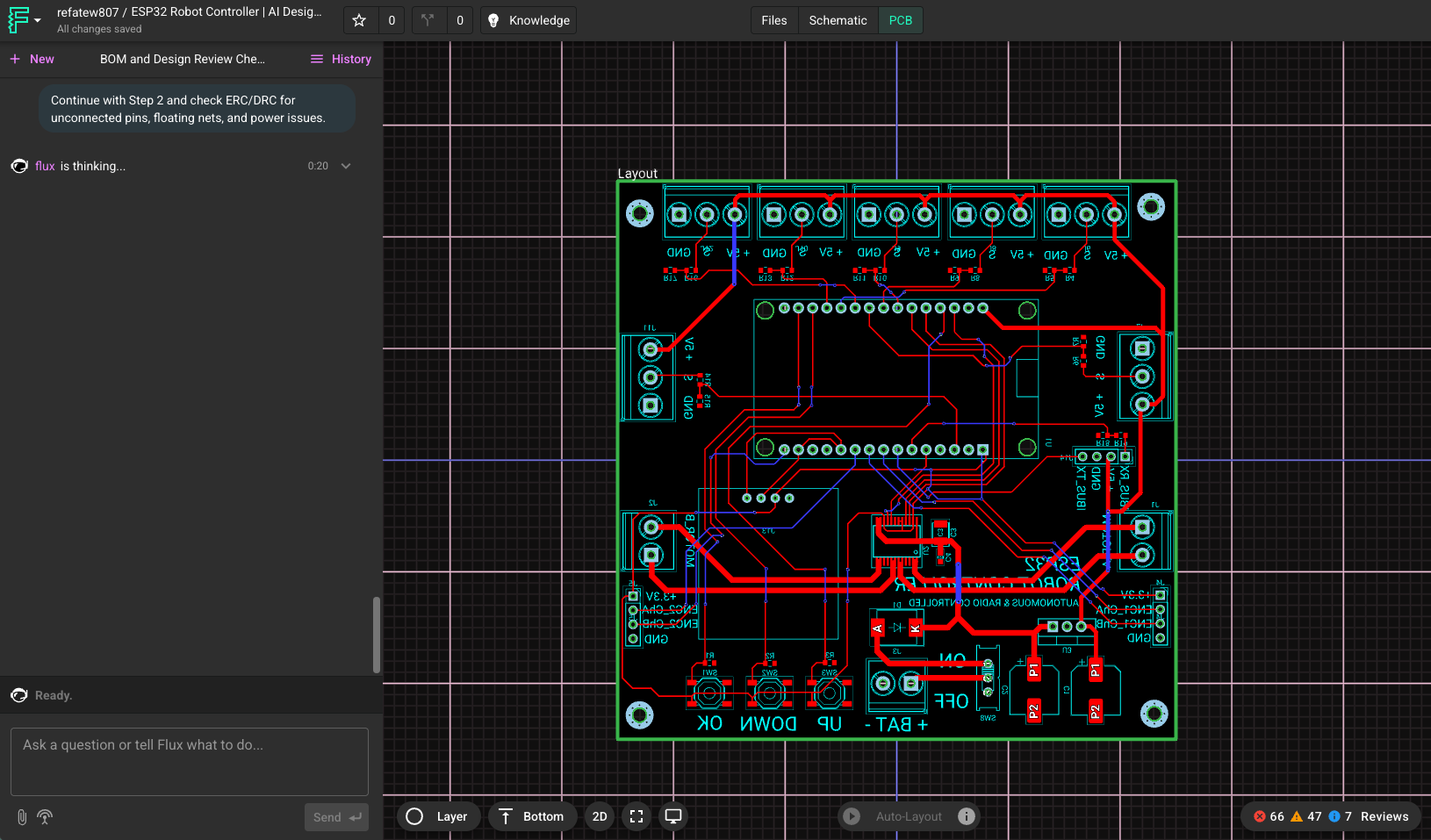
Flux.ai is a browser-based PCB design environment where AI acts as a co-pilot inside the workflow. It covers more of the design chain than either Quilter or DeepPCB, including schematic capture, component selection, and layout. Flux's AI Auto-Layout feature is a single-click router that finishes routing after you've set up constraints, placed components, fanned out fine-pitch parts, and manually routed critical signals like differential pairs, controlled impedance lines, and high-speed interfaces. The main value is accessibility and speed for teams that want to go from idea to board in a single browser-based tool.
Quilter vs DeepPCB vs Flux.ai: Key Differences Explained
The most important distinction between these tools isn't "which AI is smarter." Both Quilter and DeepPCB use reinforcement learning. The differences that matter in practice are: what complexity each tool has proven it can handle, what physics validation happens during and after generation, how well each tool fits into enterprise engineering workflows.
Physics Validation
Quilter validates layouts against circuit-level physics checks, not just geometric design rules. The physics scorecard checks bypass cap effectiveness (pin-to-pin distance, via-in-loop detection, trace length), switching converter layout quality (coil proximity, input/output cap placement), differential pair integrity (phase mismatch, coupling gap, ground plane continuity), power net current capacity (IPC-derived trace width for target ampacity), and crystal oscillator placement. These checks are derived from schematic context: Quilter knows which cap is bypassing which IC, which coil belongs to which switching converter, and what role each net plays in the circuit.
On top of that foundation, Quilter recently integrated the Simbeor field solver, the same engine behind Altium's impedance calculations, to calculate impedance profiles in real time. The result is a physics scorecard that covers signal integrity, power integrity, and manufacturing constraints in a single review.
DeepPCB takes an AI-first approach. Their reinforcement learning agent ingests routing constraints and optimizes against them. This can produce decent boards within those constraints. But the constraint set determines the ceiling of what the tool can catch. All of DeepPCB's publicly documented checks are geometric design rule checks: clearances, trace widths, via counts. They do not run circuit-aware checks like bypass cap loop analysis, switching converter layout verification, or ground plane continuity under differential pairs.
Flux's Auto-Layout optimizes for clean trace geometry: fewer vias, shorter paths, fewer layer transitions. It does not produce a physics scorecard. Flux explicitly tells users to manually route differential pairs, controlled impedance lines, and high-speed interfaces before running Auto-Layout, which means the physics-sensitive portion of the board remains the engineer's responsibility.
Proven Complexity
Quilter laid out a complete i.MX 8M Mini computer, 843 components, 5,141 pins, 8-layer stackup. Both boards were fully validated with no respins, running DDR4 memory, Gigabit Ethernet, USB, HDMI, and hardware-accelerated graphics under real workloads including Chrome, video playback, and gaming applications. The layout work that professionals quoted at 428 hours was reduced to 38.5 hours of human cleanup. Quilter has no inherent pin or layer-count limit and has processed boards beyond the Speedrun benchmark.
DeepPCB's public tier supports up to 1,000 components, 2,200 pins, 1,200 airwires, and 8 layers (per their public pricing page). This is what we were able to find in the publicly available sources, they do have an enterprise tier which might offer more capabilities.
Flux's published Auto-Layout examples are 2-layer and 4-layer boards in the 40 to 100 component range, with their showcase being an ESP32-based smart scale. Flux's own documentation states the feature is "not designed to fully autoroute every class of board without your input." For boards beyond that complexity, Flux functions as a design environment where you do the layout work manually with AI copilot assistance, rather than as an autonomous layout engine.
Enterprise Deployment and Security
Quilter supports self-hosted deployment via Kubernetes Helm chart into your own AWS environment, including air-gapped and GovCloud configurations. Quilter has active on-prem deployments with defense primes and enterprise customers who require ITAR compliance, data sovereignty, or fully offline operation. Quilter also offers dedicated engineering support for deployment, onboarding, and ongoing design iteration.
DeepPCB and Flux.ai are cloud-based, browser-delivered tools. If your organization requires that design data never leaves your infrastructure, or if your boards fall under export control, deployment model is a threshold question you'll want to answer early in your evaluation.
Pricing Comparison: Quilter vs. DeepPCB vs. Flux.ai
Pricing models vary significantly across these tools, and the right one for you depends less on sticker price than on how cost scales with your usage, iteration style, and deployment requirements.
Quilter: Pay for Completed Work
Quilter charges per board based on the number of unrouted pins at the time of upload, not by seats, compute time, or subscription. If you pre-route critical sections (RF nets, BGA fan-outs, high-voltage traces) before submitting, those pins don't count; Quilter routes around your existing work and charges only for the pins it actually handles.
Best for teams that: want predictable per-board cost, run multiple iterations per design, or need to share the tool across a larger engineering team without per-seat overhead.
DeepPCB: Pay-As-You-Go AI Credits
DeepPCB uses a credit-based model where you pay for compute time regardless of the quality of the result. You allocate a time budget to a run, the engine optimizes within that window, and you download the best result it reached. If the output isn't what you need, you pay again for additional compute.
Best for teams that: have smaller boards within the public tier limits, want a low entry cost to evaluate, and are comfortable with pay-per-attempt economics.
Flux.ai: Per-Seat Subscription
Flux.ai uses a per-seat subscription model with monthly AI credits bundled into the subscription fee. AI Auto-Layout runs consume credits based on board complexity; Flux publishes reference points ranging from roughly 375 credits for a simple 4-layer, 40-component board to 1,250 credits for a 2-layer, 100-component board. Usage beyond the included credit pool is billed as overage. Because Flux is a full design environment (schematic + layout + collaboration), the per-seat model aligns with teams using it as their primary ECAD tool rather than a point solution for layout automation.
Best for teams that: use Flux as their daily-driver design environment, have boards in the 2-layer to 4-layer range with moderate component counts, and value the collaboration features that justify a seat-based license.
Side-by-Side Comparison of AI PCB Design Tools
Here's a feature-level comparison based on each tool's published capabilities and documentation.
Which AI PCB Tool Should You Choose?
Choose Quilter when your primary goal is to cut layout time on complex boards without sacrificing engineering rigor. The workflow is: prepare the board in your existing ECAD tool, submit to Quilter, get multiple candidates back, review the physics scorecard, download, remove what you don't like, make changes, and resubmit to Quilter until you get the result you're satisfied with. Most teams do 2 to 5 iterations on a single board. Once you're happy with the results Quilter produced, you can do final cleanup in your ECAD.
What sets Quilter apart is the depth of physics validation in the output. You get back a layout that reflects how the board will actually perform, not just whether traces fit and clear DRC.
If your organization requires self-hosted deployment, Quilter is the only option among these three tools.
Choose DeepPCB when you want fast placement and routing within their published complexity range. DeepPCB is a capable engine, their public tier supports up to 1,000 components, 2,200 pins, 1,200 airwires, and 8 layers. If your boards fit within those limits and you value automatic constraint extraction and fast turnaround, DeepPCB is worth evaluating. Their pay-per-minute credit model keeps the entry cost low for smaller boards.
InstaDeep, the company behind DeepPCB, definitely has proven expertise in reinforcement learning with published peer-reviewed research focused on biological sequence modeling and genomics. They were acquired by BioNTech, a pharmaceutical company, because of their excellence in the field. We don’t want to make any assumptions about the DeepPCB’s product roadmap, but given the facts above it doesn’t seem like further development of the PCB layout engine is a high priority for InstaDeep.
Choose Flux.ai when you need the whole design chain in one place and your boards are of low to moderate complexity. If you're a startup building an MVP, a team without dedicated ECAD seats, or a product team that values rapid iteration and collaboration over constraint-heavy layout performance, Flux can reduce friction significantly. It's the tool our sales team actually recommends to prospects whose needs are more about design creation than layout automation.
How to Read an Autonomous Routing Benchmark?
Many autonomous routing benchmarks measure one thing: did the traces complete and did the result pass DRC. Those are reasonable proxies for routing speed, but they don't answer the key question—will the board actually work?
A 100% routed, DRC-clean board can still fail at bring-up. A return path that crosses a split plane, a power delivery network without enough decoupling, an "impedance-controlled" trace that wasn't actually impedance-controlled—none of these violate DRC, and none of them show up in a routing-completion benchmark.
When you read an autonomous routing benchmark from any vendor, including ours, ask three questions:
- What does "win" mean here? Trace completion and DRC pass rate are entry-level metrics. The bar that matters is electrical performance and manufacturability against a real fabricator's stackup and DFM rules. A benchmark that doesn't report those is measuring the easy half of the problem.
- What was actually validated? A benchmark that reports routing completion, time-to-route, or DRC pass rate is reporting on the software's behavior. A benchmark that reports signal integrity margins, power integrity results, EMI characterization is reporting on the board's behavior. Those are different claims, and only the second one tells you anything about whether the hardware will work.
- Where are the post-fab results? Benchmarks are simulations of success. The real test is a fab spin. If a vendor publishes routing metrics but no first-pass yield data, no customer bring-up results, and no shipping production designs, the benchmark isn't telling you whether their boards work — only whether their software finishes.
Quilter optimizes against the second set of metrics because they're the ones that determine whether a board ships. We encourage every vendor in this category to do the same.
How to Evaluate an AI PCB Layout Tool?
Skip the marketing comparisons (including this one) and test on your own boards.
- Pick a board you already know well. A validation board, a test fixture, something where you know what good looks like. If the tool produces a layout that surprises you in a good way, pay attention. If it produces something you'd need to redo completely, that tells you something too.
- Check constraint adherence, not just routing completion. A board that's 100% routed but ignores your impedance rules, your diff pair matching, or your clearance hierarchy isn't saving you time.
- Measure the full cycle, not just the AI runtime. Include prep time, upload time, review time, and cleanup time. Quilter's Project Speedrun numbers include all of it: 38.5 hours of human work against a 428-hour manual quote. That's the honest comparison.
- Ask about IP and deployment. If you're in aerospace, defense, or any environment with export control or data sensitivity, you need to know where the data goes.
Conclusion
PCB layout automation is a problem the industry has been trying to solve for over sixty years. The fact that multiple serious teams are working on it means the problem is finally getting the attention it deserves, and we think that’s a great thing.
That said, these tools represent different bets on how to solve the problem. Flux.ai bets on breadth and accessibility, bringing AI into every step of the design chain from schematic capture through routing, with Auto-Layout handling the finish work on simpler boards. DeepPCB bets on an AI-first approach, applying reinforcement learning to optimize against routing constraints. Quilter bets that the only way to automate layout at production quality is to reason from physics, validate every trace against real circuit-level constraints, handle power distribution as a first-class problem, and keep the engineer in control of every decision that matters.
If you're reading this comparison because your team is losing weeks to layout, the fastest way to get an answer is to upload a real board and run it.
Frequently Asked Questions
What is autonomous PCB design?
Autonomous PCB design tools generate complete printed circuit board layouts, including component placement and trace routing, with minimal human intervention. Unlike classic autorouters that only connect nets, autonomous engines produce full-board candidates validated against physics rules and manufacturing constraints.
What's the difference between Quilter and DeepPCB?
Both Quilter and DeepPCB use reinforcement learning for PCB placement and routing, but they differ in several important ways.
First, Quilter validates against circuit-level physics checks: bypass capacitor placement verification (pin distance, via-in-loop, trace length), switching converter layout, differential pair integrity including ground plane continuity, power net current capacity, and impedance profiles from the integrated Simbeor field solver. DeepPCB's publicly documented checks are geometric design rule checks.
Second, Quilter generates multiple candidates in parallel for comparison and exploration, while DeepPCB runs a single continuous optimization and returns its best result.
Third, Quilter offers self-hosted deployment for enterprise and defense customers (air-gapped, GovCloud), while DeepPCB is a browser-based cloud tool.
Fourth, Quilter has publicly demonstrated higher complexity, with Project Speedrun at 843 components, 5,141 pins, and 8 layers, fabricated and fully validated under real workloads. DeepPCB's publicly stated limit allows up to 1,000 components, 2,200 pins, 1,200 airwires, and 8 layers.
Is Flux.ai good for complex PCB layouts?
Flux.ai is a full browser-based design environment with an AI Auto-Layout feature that works well for low-to-moderate complexity boards, typically 2-layer and 4-layer designs in the 40 to 100 component range. Flux is transparent that Auto-Layout is "not designed to fully autoroute every class of board without your input." The recommended workflow is to manually route critical signals (differential pairs, controlled impedance, high-speed interfaces), then let Auto-Layout finish the remaining routing. For boards beyond that complexity, dedicated autonomous layout engines like Quilter or DeepPCB are better suited. Flux's strength is covering the full design chain from schematic to layout in a single collaborative, browser-based tool.
How does reinforcement learning work in PCB routing?
Reinforcement learning trains an AI agent to make sequential decisions by rewarding outcomes that satisfy design rules and penalizing violations. Over millions of simulated boards, the agent learns strategies that generalize to new designs. The key differentiator between RL-based PCB tools is what the agent is being rewarded for and what gets checked after generation. Quilter's RL is grounded in circuit-level physics: the agent is guided by constraints derived from schematic context (bypass capacitor associations, switching converter topology, differential pair relationships), and every candidate is scored against a physics scorecard that includes field-solver-based impedance checks. DeepPCB's RL applies their generalized reinforcement learning expertise to optimize against geometric routing constraints in the PCB design domain.
Which AI PCB tool supports ITAR, FedRAMP, or air-gapped deployment?
Among these three tools, only Quilter offers self-hosted deployment suitable for ITAR, FedRAMP, and defense environments. Quilter is SOC 2 Type II compliant and can deploy via a Kubernetes Helm chart into your own AWS environment or fully offline infrastructure. Quilter has active deployments with defense primes and enterprise customers. DeepPCB and Flux.ai are cloud-only, browser-based tools.
Can autonomous PCB tools replace human PCB designers?
No, autonomous layout tools replace the routine, time-consuming portions of layout work so senior designers can focus on the highest-risk decisions. Typical workflows involve the engineer pre-placing and pre-routing critical sections (high-speed buses, sensitive analog, power delivery), letting the AI handle the remaining 80%, then doing final cleanup. Review, constraint definition, and design sign-off remain human responsibilities.
How do I evaluate an AI PCB layout tool?
Test on a board you already know well, a validation board or test fixture where you know what "good" looks like. Measure the full cycle (prep, upload, review, cleanup), not just AI runtime. Check constraint adherence, not just routing completion: a 100% routed board that ignores your impedance rules or diff pair matching isn't saving time. Check whether the tool handles power distribution or leaves you rebuilding pours and planes by hand. Ask what physics the tool actually checks: geometric DRC is table stakes; circuit-aware checks like bypass capacitor placement verification, switching converter layout verification, and differential pair ground plane continuity are what separate layout automation from a better autorouter. Ask about deployment, IP handling, and iteration economics before committing.
What file formats do autonomous PCB tools support?
Quilter reads and writes native files for Altium, Cadence Allegro and OrCAD, Siemens Xpedition, and KiCad. DeepPCB has native support for Zuken and KiCad, with imports from Altium, EasyEDA, Eagle, and Proteus. Flux.ai is a self-contained browser environment with its own design database, with export options to standard formats.




.webp)




















